Perth free local SEO toolkit
Perth local SEO toolkit
Plan local search content for Perth’s northern industrial areas, eastern freight precincts and the southern Western Trade Coast. Check a title and description, verify local details and work through a practical Google Business and backlink checklist.
What is local seo toolkit?
A local SEO toolkit is a set of drafting and verification checks that helps a business publish accurate suburb content, consistent contact details and useful search snippets.
Last reviewed 19 October 2026
Title and meta description checker
52 characters · Good length (aim 30–60)
133 characters · Good length (aim 120–160)
Search result preview
Free Vending Machines Canning Vale | Site Assessment
freevendingmachines.au
Workplace drink and snack vending in Canning Vale 6155. Request a site assessment to confirm access, product options and suitability.
Perth precinct and postcode reference
Use this table to identify local research targets, not to claim an office or customer in each suburb. Postcodes are delivery-area references; check the exact address and current council planning information before publishing zoning or council-boundary claims. The source links below support the geographic context, while service promises need the operator’s own evidence.
| Suburb or precinct | Postcode | Research context |
|---|---|---|
| Malaga | 6090 | Northern manufacturing and distribution |
| Welshpool | 6106 | Eastern freight and industrial supply |
| Canning Vale | 6155 | Southern warehousing and manufacturing |
| Hazelmere | 6055 | North-eastern logistics and industry |
| Kewdale | 6105 | Eastern freight-related workplaces |
| Kwinana Beach | 6167 | Southern heavy-industry corridor |
Perth local search needs more than a statewide mining message
A Canning Vale warehouse manager should not have to read through a Pilbara mining pitch to understand workplace vending. Malaga, Welshpool and Kewdale have distinct metropolitan industrial contexts, while Hazelmere adds a north-eastern logistics focus. Structure Perth pages around those real areas and the decisions a host must make: where employees take breaks, how a provider gains access and which product types suit the available room.
The Western Trade Coast is described by the WA Government as part of the Perth metropolitan area. Kwinana Beach can therefore sit within a southern metro industrial cluster, but heavy-industry site requirements still need individual confirmation. Mention procurement, induction and safe machine placement as questions to resolve rather than promising a universal servicing schedule. Do not imply that a Perth photograph documents a particular southern installation unless that is genuinely what it shows.
Keep Perth metro and regional WA coverage distinct
Kalgoorlie, Bunbury and Karratha are not Perth suburbs. A statewide service business may cover them, but the regional page should explain its own travel and access arrangements. Assigning the Perth local SEO guide to every WA place would blur that difference. Use the Perth hub and relevant metro suburb links for metropolitan visitors, and retain regional hubs for people researching a separate town or remote-site service.
For postcode content, check Canning Vale 6155, Welshpool 6106 and Malaga 6090 against Australia Post and verify the exact site address. Kewdale 6105 and Hazelmere 6055 help distinguish freight-related areas that might otherwise be bundled as eastern Perth. A postcode table is a navigation and research aid, not proof of a depot, technician base or approved industrial zoning. Only state those operational facts when the business can substantiate them.
Earn Perth references through local business evidence
Investigate legitimate Canning, Swan and other Perth business participation opportunities relevant to the precinct being covered. Use council investment information to understand local industry rather than treating every government page as a directory that must link to you. CCIWA and industry networks may provide useful connections, but check membership requirements and current directory rules directly. Record what the relationship is before requesting a reference or submitting business details.
A consenting Perth host can provide a practical story about staff access, product selection and the agreed assessment process. Keep confidential induction details and site security out of public copy. Ask the host to approve its name and any installed-machine photo; otherwise describe an anonymised workplace only if that example is real. A generic planning illustration should be clearly presented as an illustration, not captioned as a Malaga, Welshpool or Canning Vale installation.
Draft a title and description with the free checker
Use the editable checker on this page to test a suburb title and suggested search description. The title counter uses 30–60 characters as a convenient drafting range and the description counter uses 120–160. These are editorial targets, not Google limits. Display width, device and query affect what appears, and Google may rewrite either field. Keep the service and place early so a shortened result still makes sense.
Start with the provided local example and replace the suburb only when the underlying page genuinely serves that place. Then rewrite the description to match the workplace audience and actual assessment process. Do not add a fast install promise, weekly servicing guarantee or unverified price to make the preview more appealing. Compare the draft with the H1 and first paragraph; they should confirm the same purpose, not promise different offers.
Check the page address and sharing details
A canonical link identifies the preferred address of a page. For a distinct suburb page it should point to that same page, not automatically to the homepage. Check that the title, description and Open Graph sharing details belong to the local page. A shared link should not inherit the title of another city. Australian-English language annotations should be consistent with the preferred address, rather than mixing language labels that conflict.
Structured data is machine-readable information about the visible content. Use an Article for a guide and a breadcrumb trail for its position in the site. Do not add fabricated local addresses or business branches to structured data. Only describe real facts also supported by the page. A map pin, service-area mention or postcode table does not establish a staffed office. Check the rendered page, not just a settings screen, before treating the publishing checks as complete.
Complete an honest Google Business setup checklist
First confirm that the business has eligible in-person customer contact. Choose the actual trading name, phone and website, and select the closest category currently available. A business that visits workplaces and does not receive customers at its base should hide the address and describe its genuine service area. Google allows up to 20 service areas and generally recommends a boundary within about two hours of the base; check the current guidance linked below before setup.
Only the owner can complete the verification method Google offers for that business. Do not assume it will be a postcard or promise approval. Keep location evidence private and do not create extra suburb listings to expand map visibility. A website page can cover a suburb without a separate Business Profile. Once verified, maintain accurate hours and use approved real photographs. The toolkit does not connect to Google or submit a profile on the reader’s behalf.
Build a citation and backlink evidence sheet
A citation is a business reference such as a directory entry containing the trading name, phone and website. A backlink is a clickable reference from another website. Start a simple record with the organisation, existing relationship, destination page, contact, permissions and last review date. Check current membership and directory eligibility before applying. Council information pages are research sources and do not automatically offer listings or endorsements.
Prioritise relationships that help a customer judge the service: an approved host story, supplier reference, genuine membership or community activity. Ask for accurate mentions rather than exact-match keyword links. Never buy a package promising guaranteed rankings or invent a connection to a chamber. If an address is hidden on the Business Profile, do not publish a private home address in a directory merely for consistency. Keep public contact details truthful and private evidence secure.
Run the suburb-page publication checklist
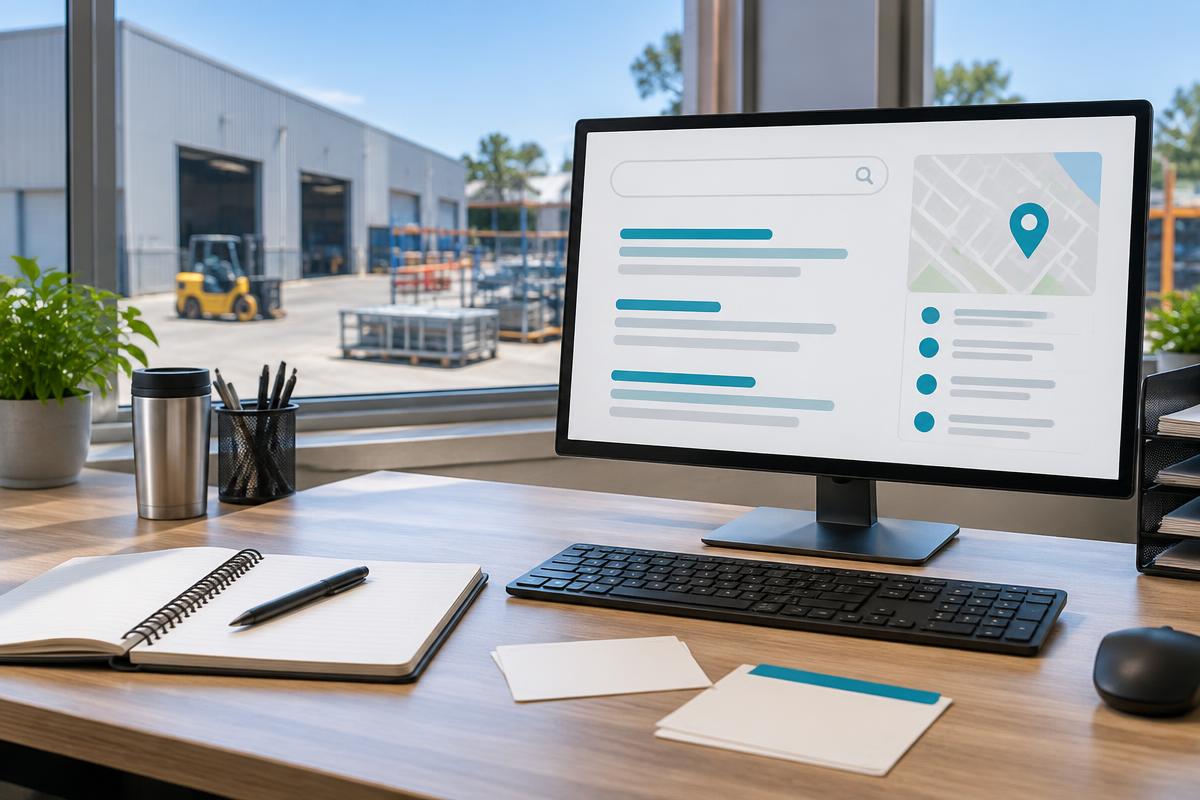
Read the page as a site manager. Confirm the suburb and postcode, the relevant workplace types, access questions, assessment process and clear enquiry destination. Follow every local link and confirm that it opens the correct neighbour or hub. A useful image should illustrate the subject; label a generated planning image as an illustration and never pass it off as a customer installation. Any real site photo needs permission and a factual caption.
Keep the page available to crawlers if it is intended for search, include it in the sitemap and confirm that the final published address loads. The preview and live site can differ until publication. Search Console can help monitor discovery after the sitemap is submitted, but cannot promise immediate indexing. Revisit the page when contact details, service coverage or equipment facts change instead of leaving an outdated claim beside a working enquiry form.
Track the next useful action every month
Record the date, local page, search query, impressions, clicks and genuine enquiries in a simple review sheet. Look for the mismatch between what people search and what the page actually answers. A page with clicks but no enquiries may need a clearer assessment explanation rather than more keywords. Check that mobile readers can reach the enquiry form and that local links do not send them to an unrelated state or regional town.
Separate observations from assumptions when reporting results. Our owner-supplied machine sales baseline is $4.40 per vend and 50–80 vends weekly, equivalent to $220–$352 gross weekly sales; it is not an SEO conversion benchmark or a profit guarantee. Stock costs, servicing and investment still require their own evidence. In the same way, rank changes and backlink counts are signals, not proof that an edit caused more qualified customers. Review actual enquiries and keep the next change specific.
Sources and verification
Official postcode, precinct and Google Business guidance. Check the exact site address and current eligibility before making a business claim.
Experience you can check
Who installs your machine in Australia, and exactly how it runs
Written and maintained by Dan Barnes — owner-operator, Free Vending Machines Australia
I have been placing and servicing vending equipment in Australian workplaces for over two decades — offices, warehouses, gyms, hospitals, schools, remote camps and government sites. Everything on this page reflects how we actually run installs across every state and territory: the machines we physically stock, the lead times our crews hold to, and the service standard we carry at our own cost. Nothing here is licensed boilerplate.
- Typical Australian lead time: 7–14 days from a qualified request to a working machine.
- $20 million public liability plus product liability — certificate of currency supplied to your facilities or WHS team on request.
- Australian-owned, Australian-serviced. Same operator answers the phone on0401 NO COST.
- Nayax cashless readers and live telemetry on every machine — not a retro-fitted coin mech.
What to expect, step by step
1. Two-question request
You tell us the workplace type and rough head count. No paperwork, no credit check, no sales visit required to get an answer.
2. Site check within 24 hours
We confirm head count, foot traffic, power location and access (lifts, stairs, loading dock, after-hours security) and pick the right machine.
3. Delivery and install
Our crew delivers, levels and commissions the machine, tests the cashless reader end-to-end and takes the packaging away. Nothing is invoiced.
4. Telemetry goes live
Every vend, temperature reading and fault code streams back to us. Low stock is flagged 2–3 days before a row empties.
5. Ongoing service, still $0
Restocks, cleaning, repairs, parts, product-mix changes and $20m public liability are all carried by us. Ask us to remove it and we do — no exit fee.
The exact machines we install
These are our three workhorse combination machines — photographed as they leave our workshop, stocked with the Australian brands your team actually buys. We recommend one based on your head count and floor space, never on what happens to be in the truck.
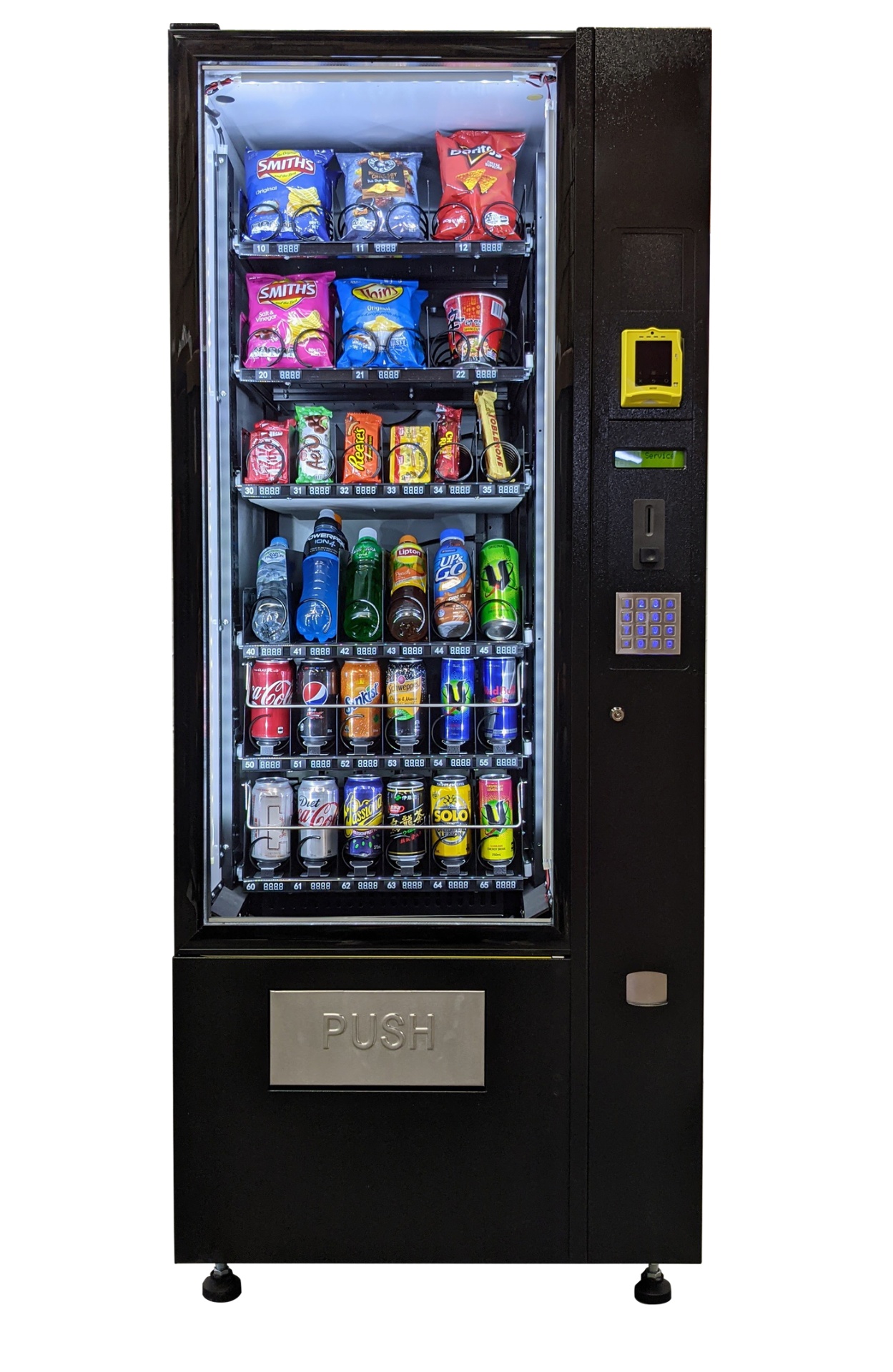
CV3 combo — slimline snack & drink
890mm wide · 1830mm high · 830mm deep
- Best for 15–40 staff, tight lift lobbies and narrow doorways to lunchrooms
- 6 shelves: 2 crisps, 1 confectionery, 3 refrigerated drink rows
- Nayax tap reader — Visa, Mastercard, Amex, Apple Pay, Google Pay
- Standard 10-amp GPO, no plumbing, no data cabling
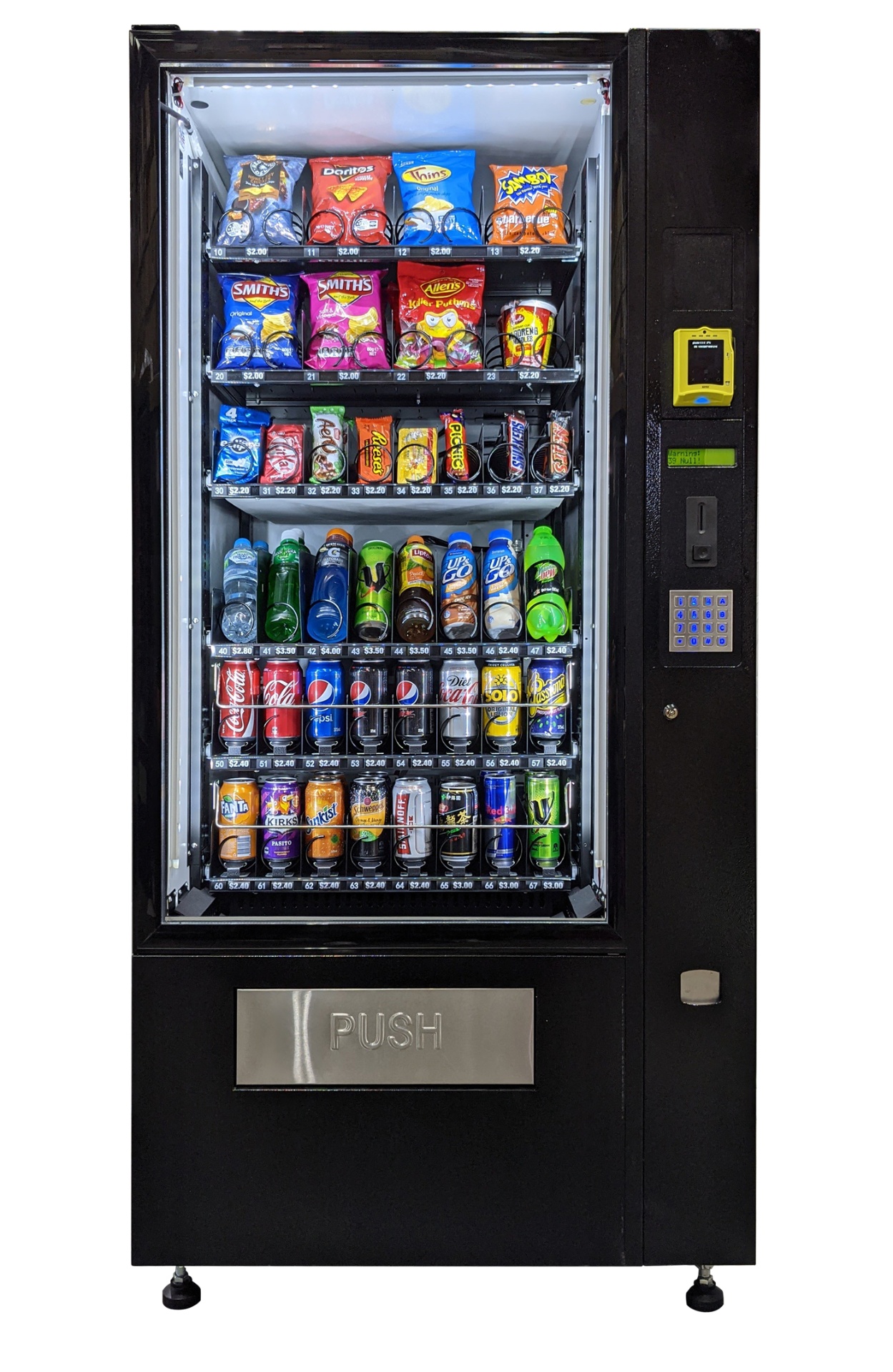
CV4 combo — mid-size with priced shelf labels
1000mm wide · 1830mm high · 830mm deep
- Best for 40–90 staff or a shared floor between two tenancies
- Live per-shelf pricing labels so staff see the cost before selecting
- Wider drink bays for 600ml bottles, iced coffee and energy cans
- Telemetry reports each vend, so restocks are scheduled on real data
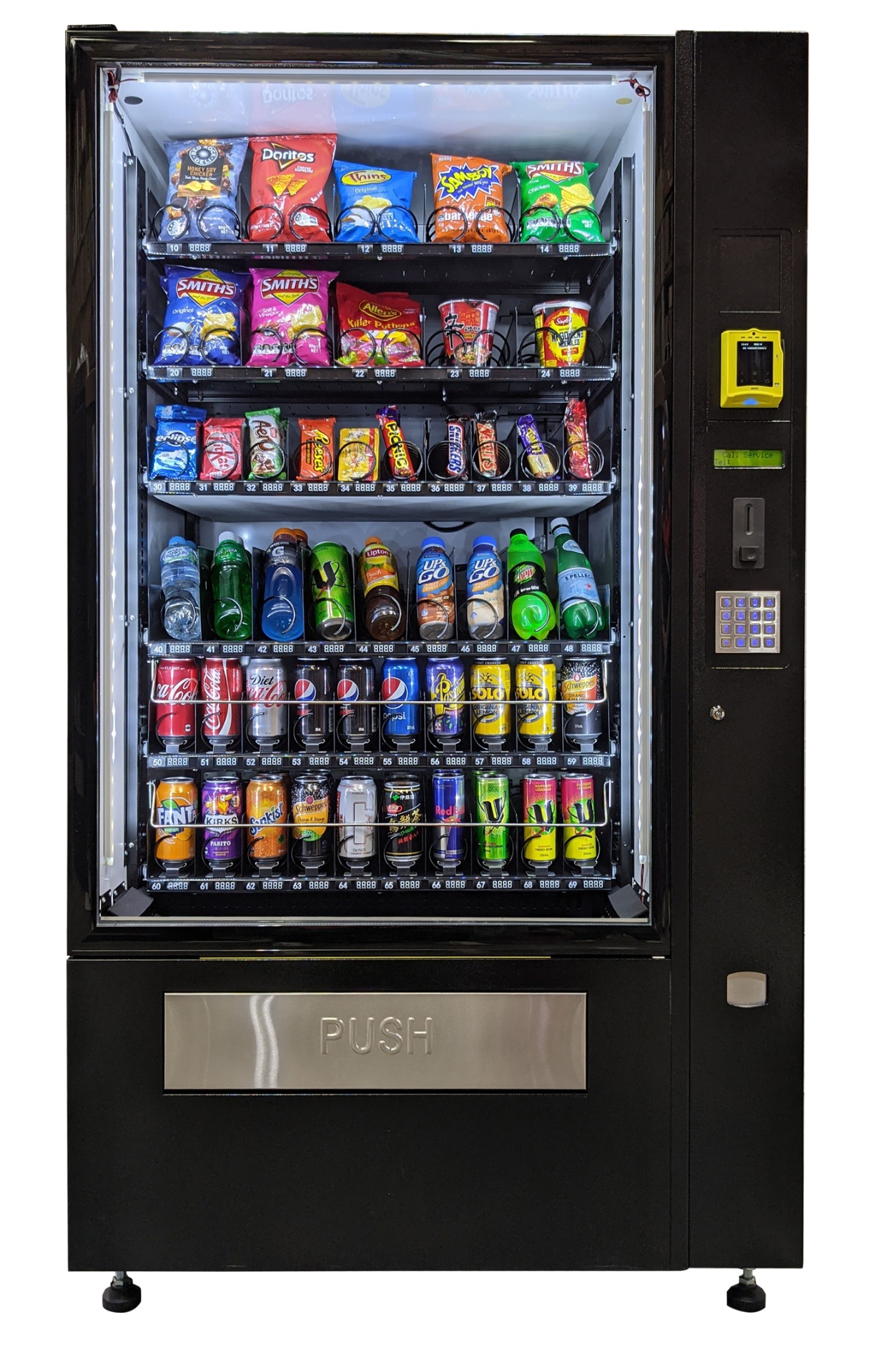
CV5 combo — high-capacity site machine
1200mm wide · 1830mm high · 880mm deep
- Best for 90+ staff, 24/7 shift sites, warehouses and gyms
- Up to 60 selections — the widest range we can put on one footprint
- Reinforced glass and hardened electronics for industrial floors
- Twin-bank refrigeration keeps drinks cold through summer peaks
FAQ
Frequently asked questions
Does every Perth suburb need a Google Business listing?+
No. A suburb page does not justify another listing. Use an eligible real business location and truthful service areas; never create profiles at unstaffed virtual offices.
Are the title and description counts exact Google limits?+
No. They are drafting ranges. Google uses available display width and may rewrite search titles or snippets for a query.
Do council source links mean a backlink is available?+
No. They verify local context. Directory access, memberships and any reference must be checked directly and reflect a genuine relationship.
What is a useful starting suburb for the Perth checker?+
Canning Vale 6155 is the provided draft example. Use a different place only when the page contains accurate information for that locality.
Grow your local presence
Free guides on local SEO, vending costs, ROI and business planning.
Ready for a free vending machine at your workplace?
Two quick questions and you're on your way. No contract lock-ins, no hidden fees.